> For the complete documentation index, see [llms.txt](https://docs.metanames.app/llms.txt). Markdown versions of documentation pages are available by appending `.md` to page URLs; this page is available as [Markdown](https://docs.metanames.app/getting-started/register-domain.md).
# Register domain
Create your web3 domain!
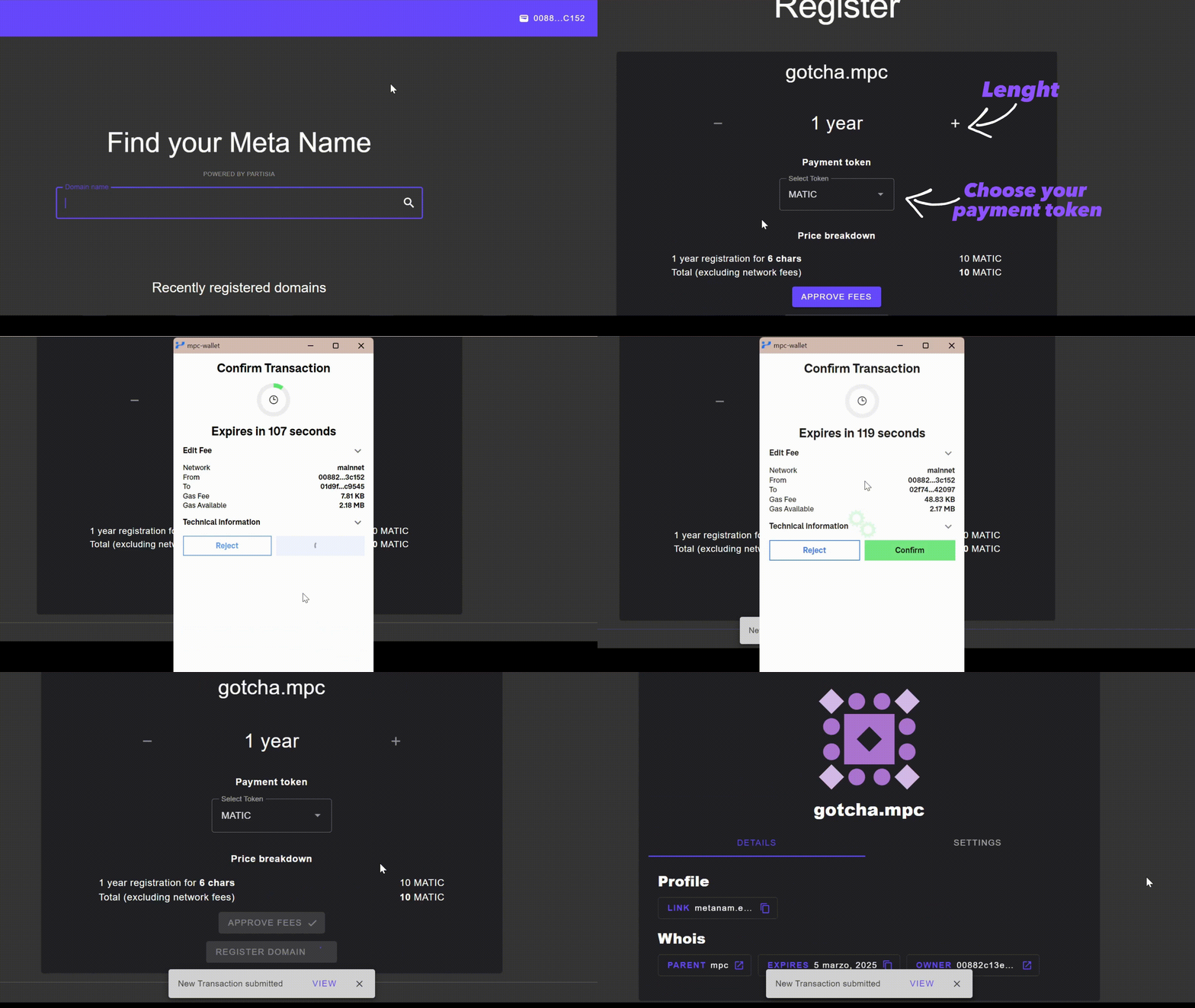
Register your **unique** Meta Name by following these steps:
1. [Connect your wallet](/getting-started/connect-your-wallet.md)
2. Search for the domain you want from the home page and open it if it is available
3. Choose how many **Years** to register it for
4. Under **Pay with**, select the BYOC token you deposited earlier in [Deposit tokens](/getting-started/deposit-tokens.md)
5. Click **Approve fees** and confirm in your wallet
6. Once the approval is confirmed, click **Confirm & pay** and approve the second transaction
7. Domain registered! :tada:
{% hint style="info" %}
Registration always takes two transactions: the first approves the fee transfer, the second mints the domain. The total shown excludes network gas fees.
{% endhint %}
Every domain ends in `.mpc`.
To register a subdomain, search for the full name — for example `blog.supercool.mpc`. The parent domain has to exist already, and subdomains are minted **free** in a single transaction, with no duration or token to pick.