> For the complete documentation index, see [llms.txt](https://docs.metanames.app/llms.txt). Markdown versions of documentation pages are available by appending `.md` to page URLs; this page is available as [Markdown](https://docs.metanames.app/domain-management/transfer-domain.md).
# Transfer domain
Transfer your Meta Names domain
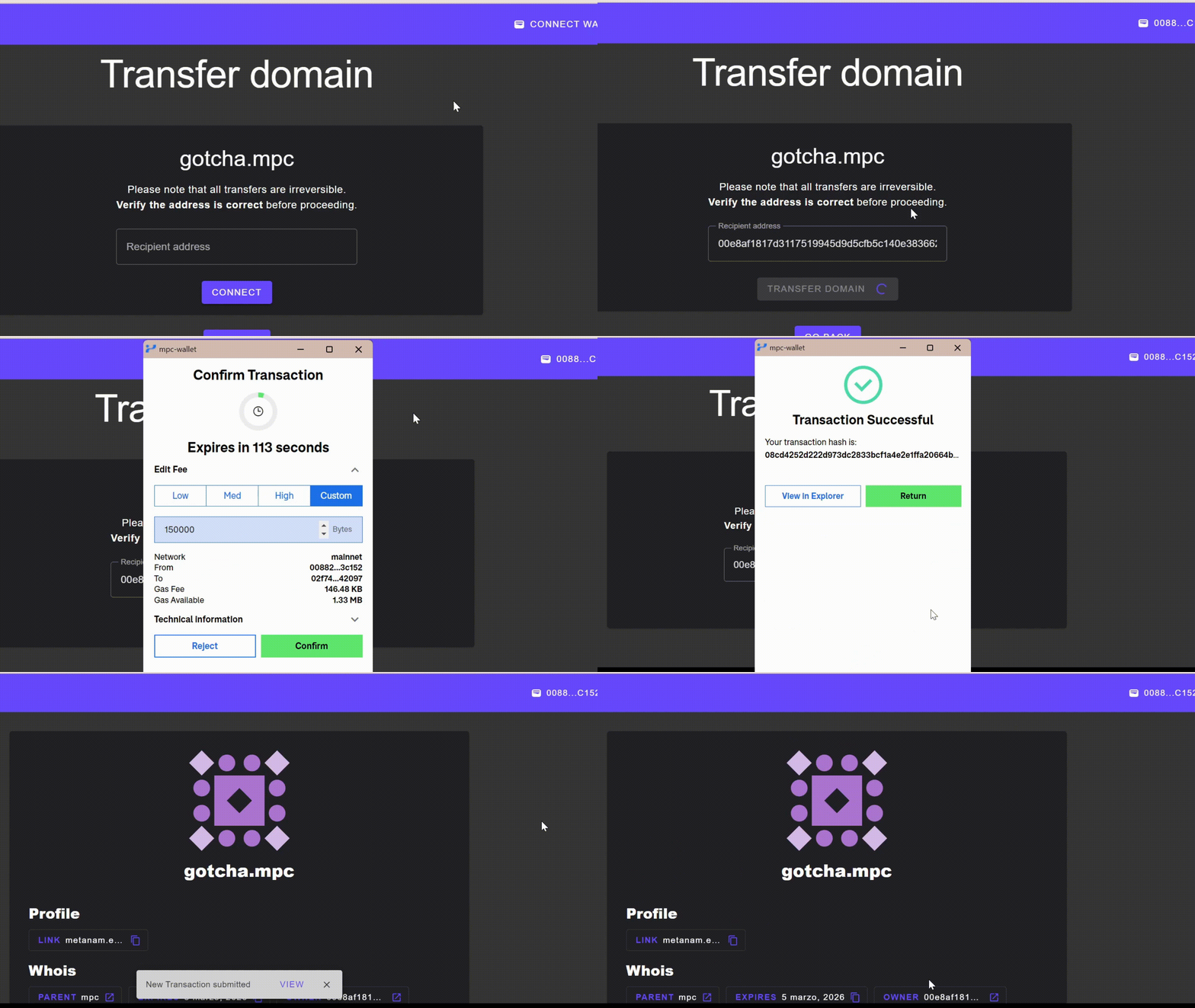
To **transfer your domain**, you need the address of the destination wallet.
Follow the steps below:
1. Visit [app.metanames.app](https://app.metanames.app) and [Connect your wallet](/getting-started/connect-your-wallet.md)
2. Navigate to the [Profile](/domain-management/profile.md)
3. Choose the domain you want to move to open its page, then click **Transfer**
4. Paste the recipient's wallet address into the **Recipient Address** field
5. Click **Transfer domain** and confirm the transaction in your wallet
6. Profit! :tada:
The address must be 42 characters long. The button stays disabled until a valid address is entered.
{% hint style="warning" %}
Transfers are irreversible. Make sure you or the recipient can access the destination wallet, or the domain will be lost!
{% endhint %}